5.Summary of Automation Test using SOAPUI

SUMMARY:

  • SOAPUI is open source functional testing tool for SOA(Service Oriented Architecture) and Web Service Testing.
  • Using SOAPUI, we can perform Functional, Regression and Load testing.
  • SOAPUI works on XML where we can send the Request through XML and get the Server Response.
  • Using SOAPUI its very easy to create different test suits  and test cases with different data and use them to perform web services test.
Download and Install SOAPUI tool, once it is installed it will look like
soap1

Steps to perform Automation Test for Web Services using SOAPUI

Step 1: Go to File and click on New Soap Project

soap2

Step 2: Enter Project Name(We can enter any name of our choice)
soap3

Step 3: Enter Initial WSDL url--http://www.webservicex.net/CurrencyConverter.asmx?wsdl and Click OK.

             WSDL is nothing but end point url which should be provided to test web services.
soap4

Step 4: Once we Click Ok we will see a new Project has been created in the Left Side, this project is to convert the Currency of one country to another country.

soap5

Step 5: Double click on Request1 will load the script.

soap6

step 6: Now Request is ready and Now have to see the Response after adding the value to the Request and Trigger it.

Step 7: Now we will test this service by adding FromCurrency as USD and ToCurrency as INR and Trigger the Request.
soap7

Now we can see the Response here that Currency has been converted and fetched in the Response.So we can conclude that this web service works and similarly we test this web service by changing the Request.

CREATION OF DIFFERENT TEST CASES WITH DIFFERENT VALUES:

Step 1: Click on (+) logo to add test case.

soap8

Step 2: We can give any name for this test suite but by default it is TestSuite1 and click OK.

soap9

Step 3: Enter test case name(any) and click OK.

soap10

Step 4: Then will open POP UP  "Add Request to Test Case". Click OK.

soap11

Step 5: Test case will be created as shown below and click on green arrow to tun this test case.

soap12

Step 6: Once the test gets completed, If test is passed we can see it in green in color otherwise red in color if test fails.

soap13

Similarly we can create more than one test case by adding different values in the Request.

HOW TO ADD AND VALIDATE ASSERTION IN TEST CASES:

Step 1: Double click on Conversion-Request1 which is on the left pane.

Step 2: Click on "Adds an assertion to this item" icon shown on the top.

soap14

Step 3: Click on "XPATH match" and then click on "Add" button.

soap15

Step 4: Declare XPath Expression which we want to validate and provide the Expected Result in the box.

soap16

Step 6: Click on Save button and run the script by clicking on green arrow as shown on the top

soap17

Once we run the script we can result at the bottom with validation passed or failed.

soap18

4.Create Test Suite and Test Case

For Example, If you want to convert GPB to INR instead of  USD of INR...You need edit the operation again. So, one has to create a test suite/test cases to have all possible scenarios tested without editing the operation directly itself.

CREATING TEST SUITE:

Step 1: Within the Project, Testers can create a test suite by performing a right click on the root of the project.

SoapUI Tutorial: Create a Project, Test Suite, TestCase 

Step 2: Enter the name of the Test suite and Click OK.

SoapUI Tutorial: Create a Project, Test Suite, TestCase

Step 3: The created test suite is displayed on the navigator pane as shown below

SoapUI Tutorial: Create a Project, Test Suite, TestCase 

Step 4: Click on Test suite name to view test cases if created any.

SoapUI Tutorial: Create a Project, Test Suite, TestCase


CREATING TEST CASE:

Step 1: Right click on 'Test suite' to which allows to create multiple test cases and choose 'New Test Case'.

SoapUI Tutorial: Create a Project, Test Suite, TestCase 

Step 2: Enter name of Test Case and Click OK.

SoapUI Tutorial: Create a Project, Test Suite, TestCase

Step 3: The created Test Case has zero steps as shown below.

SoapUI Tutorial: Create a Project, Test Suite, TestCase

Step 4: we can insert a variety of test steps by performing Right click on Test Steps and select appropriate test step. So if we were to test a REST WebService, select REST Test Request.

SoapUI Tutorial: Create a Project, Test Suite, TestCase

To know how to add a Test Step to validate the imported SOAP  Request, Click on TEST STEP INSERT  

3.Create Project

Before creating a SOAPUI Test Case, have a look at

PROPERTIES OF SOAP PROTOCOL:

  • SOAP stands for Simple Object Access Protocol.
  • SOAP is an XML based Protocol for Communicating between two different Systems.
  • SOAP is a Platform and Language Independent. Hence, a System developed using JAVA  can Communicate with a different System developed in .NET.
  • SOAP Requests/Responses are transported via HTTP.

SOAP MESSAGE FORMAT:

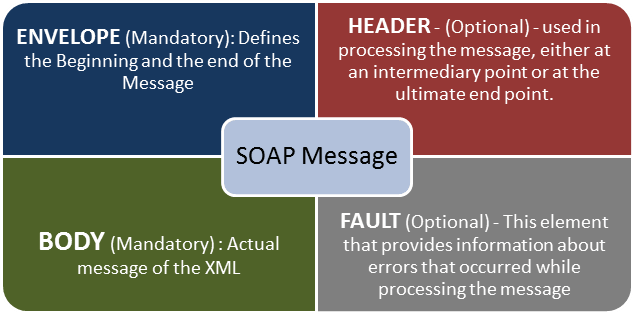
A SOAP Message is an Ordinary XML Document containing the following elements. Message can be either a Request Message or a Response Message.

SoapUI Tutorial: Create a Project, Test Suite, TestCase

After setting up the WorkSpace by Installing and Configuring the SOAPUI, We have to create Projects, Test Suites,Test Cases in order to test a given Web service.

CREATE A PROJECT:

Step 1: Depending upon the Project we need to import REST/SOAP. Now we will create a New SOAP Project by clicking on WorkSpace name.

SoapUI Tutorial: Create a Project, Test Suite, TestCase

Step 2: By using the following Request
                         http://www.webservicex.net/CurrencyConvertor.asmx?WSDL
              1. Enter the Project Name
              2. Enter the path of the WSDL Request. In this Case
                         http://www.webservicex.net/CurrencyConvertor.asmx?WSDL 
              3. Click OK.

SoapUI Tutorial: Create a Project, Test Suite, TestCase

Step 3: After creating a SOAP Project, We can see that there are two operations that will be imported
             into the Project.

SoapUI Tutorial: Create a Project, Test Suite, TestCase

Step 4: 1. Expand the first Request and Double click on the 'Request1', then it will display the SOAP                      Request in the XML Format.
             2. Enter the From Currency and To Currency.
             3. Click on the Submit Button.
             4. Response XML will be displayed on the Right side pane.

SoapUI Tutorial: Create a Project, Test Suite, TestCase


2.Introduction to SOAPUI Testing

WHAT IS SOAPUI?

  • SOAPUI is the leading open source cross platform API(Application Programming Interface) Testing Tool.
  • SOAPUI allows testers to execute Automated Functional, Regression, Compliance and Load Tests on different Web API.
  • SOAPUI supports all the standard Protocols and Technologies to test all kinds of API's.
  • SOAPUI works on XML where you can send Request through XML and get the Response from Server.
  •  Using SOAPUI its very easy to create different test suites and test cases with different data and use them to perform Web services Test.

WHY TO USE SOAPUI?

  • SOAPUI is not just a Functional API Testing tool but also let us  perform Non-Functional Testing such as Performance and Security Test.
  • For more information click Features of SOAPUI.

SOAPUI VS SELENIUM:

                             SOAPUI                                                                  SELENIUM

1. SOAPUI is used only for WebAPI or WebService            1.Selenium is used for User 
 Testing but not for User Interface Testing.                             Interface Testing.            

2. SOAPUI can Test data sent and received between            2. Selenium can test the UI 
the web browser and the web server and also can                  behavior but cannot test the
test the Protocols/Technollogies such as REST                       Protocols.
and SOAP.                                                                                

3. SOAPUI can perform Fucntional, Load and                     3. Selenium can perform only 
  Security Testing of REST and SOAP.                                  Functional Testing and 
                                                                                               Performance Testing to some 
                                                                                               extent but cannot perform
                                                                                               Security Testing.  

4. SOAPUI is Protocol Dependent but not Browser             4. Selenium is browser Dependent.
    Dependent.                              

To Download and Install SOAPUI tool click on Download and Install and Configure

1.Web Service Testing

WHAT IS WEB SERVICE?

  • A Web Service is a medium of Communication through which two Applications can transfer data irrespective of their architecture and technology.
  • Web service is a standardized medium to propagate communication between the client and server applications on the World Wide Web.

WHY IS WEB SERVICE NEEDED?


  • In general,when a person sends request to a software service,in return,it sends response in human readable format.
  • In the modern era of technology, if you want to build a software application you don't need to build each and everything from scratch. There are lots of readymade services available which you can plug into your application and you can start providing those services in your application.   
  • The client would invoke a series of web service calls via requests to a server which would host the actual web service.These requests are made through Remote Procedure Calls(RPC).

      WHAT IS RPC?


  • Remote Procedure Call (RPC) is a protocol that one program can use to request a service from a program located in another computer on a network without having to understand the network's details. 

EXAMPLE:


  • As an example, Amazon provides a web service that provides prices for products sold online via amazon.com. The front end or presentation layer can be in .Net or Java but either programming language would have the ability to communicate with the web service
  • The main component of a web service is the data which is transferred between the client and the server, and that is XML (Extensible markup language) a counterpart to HTML and easy to understand the intermediate language that is understood by many programming languages.
  • So when applications talk to each other, they actually talk in XML. This provides a common platform for application developed in various programming languages to talk to each other.

TYPE OF WEB SERVICES

There are mainly two types of web services.

1. SOAP(Simple Object Access Protocol) web services. 

  •  SOAP is known as a transport-independent messaging protocol. 
  • SOAP is based on transferring XML data as SOAP Messages.
  • Each message has something which is known as an XML document. Only the structure of the XML document follows a specific pattern, but not the content. 
  • The best part of Web services and SOAP is that its all sent via HTTP, which is the standard web protocol.

2. REST(REpresentational State Transfer) web services.

  • The REST style emphasizes the interactions between clients and services, which are enhanced by having a limited number of operations and this generally runs over HTTP.
  • REST is an alternative to SOAP  and instead of using XML for request, REST uses simple URL in some cases.
  • Rest API supports both XML and JSON format. It is usually preferred for Mobile and Web apps as it makes app work faster and smoother. 

WSDL(Web Service Description Language)

  • SDL is an XML based language which will be used to describe the services offered by a web service.
  • WSDL describes all the operations offered by the particular web service in the XML format. 
  • It also defines how the services can be called, i.e what input value we have to provide and what will be the format of the response it is going to generate for each kind of service.  
WHAT IS WEBSERVICE TESTING?

  • Web Services Testing is testing of Web services and its Protocols like SOAP & REST. To test a Webservice you can
         1. Test Manually
         2. Create your own Automation Code
         3. Use an off-the shelf automation tool like SoapUI.

WebService Testing involves following steps -

         1.Understand the WSDL file
         2.Determine the operations that particular web service provides
         3.Determine the XML request format which we need to send
         4.Determine the response XML format
         5.Using a tool or writing code to send request and validate the response

Steps 1 to 4:

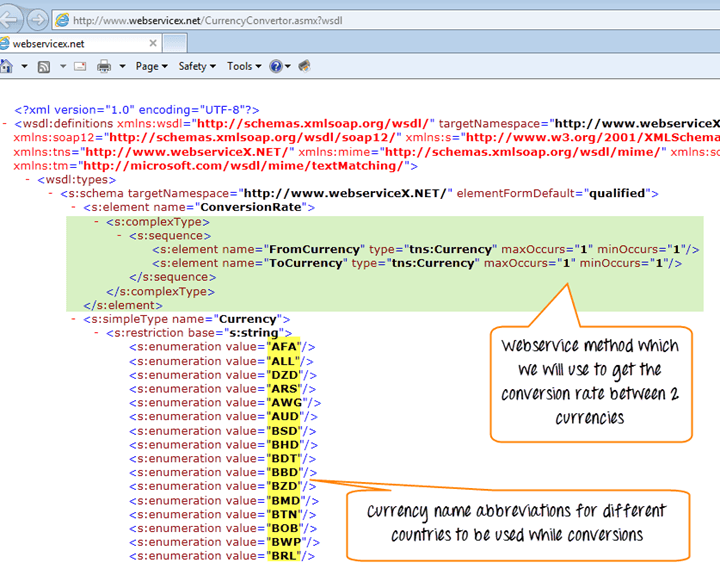
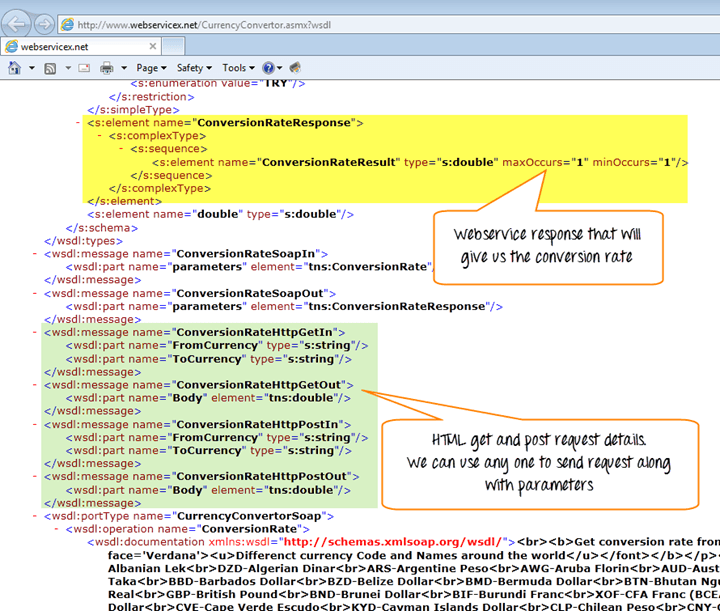
Currency Convertor WSDL file can be seen @ (http://www.webservicex.net/CurrencyConvertor.asmx?wsdl) which will give the information about the Currency Convertor web service methods which it will support, the parameter which we need pass and the type of parameters… etc

Web Service Testing: A Beginner's Tutorial


Step 5:Using a tool or writing code to send request and validate the response
  • There are lots of tools available to test web services. SOAPUI is one of the popular tool which will help us to test the web services. 
  • In fact you can use any programing language which is capable of sending the XML request to the web service provider application over the http and able to parse and validate the response XML against the expected result. In our case, we will test the WebService using SOAPUI.
USING SOAPUI TO TEST THE WEBSERVICE:

In SOAPUI

        1.Go to File>New Soap Project
        2.Enter Project Name and WSDL URL Name
        3.Click Ok
Web Service Testing: A Beginner's Tutorial

        1.Expand the first Request and Double Click on the 'Request1'. It will display the SOAP Request in the XML Format.
        2.Enter the From Currency and To Currency.
        3.Click on the Submit Button.
        4.Response XML will be displayed Right Side Pane.

Web Service Testing: A Beginner's Tutorial